¶ 1. A primer on Gantt charts
Tasks are time-related to other tasks, such as an F-S relationship: Task2 can only Start after the previous task (task1) is Finished. Other relationships are F-F and S-S. In addition, a lag can be introduced into that relationship. For example, an F-S relationship with a lag of 5 days means that task2 will start 5 days after task1 is finished. Adding up all these relationships together with the task durations allows the build-up of a Gantt chart where the start of each task can be estimated. The timeline essentially defines the earliest time that a task can start (ES) as well as a contingent late start (LS) which defines the maximum delay relative to the ES without affecting other tasks.
The project manager needs to be practical: an F-S relationship with a lag is theoretical and is an estimate. Thus, in practice, in an F-S relationship, work might start on task2 before the predecessor task1 is finished, contrary to the schedule. When the Task2 Owner becomes aware of this potential earlier Task2 start, the Task2 Owner could update the lag between the two tasks. In the example below, the Owner introduced a negative lag for the last task

A task duration may be shortened by, for example assigning an additional team member to the task. The Task Owner should change the duration of task2, otherwise, the succeeding task3 (in this case its ES) will not be updated either. ProjectContexts cannot automate that change, but it is easy for the Task Owner to do this manually.

Finally, the Gantt chart calculation also relies on constraints that can be applied to each task:
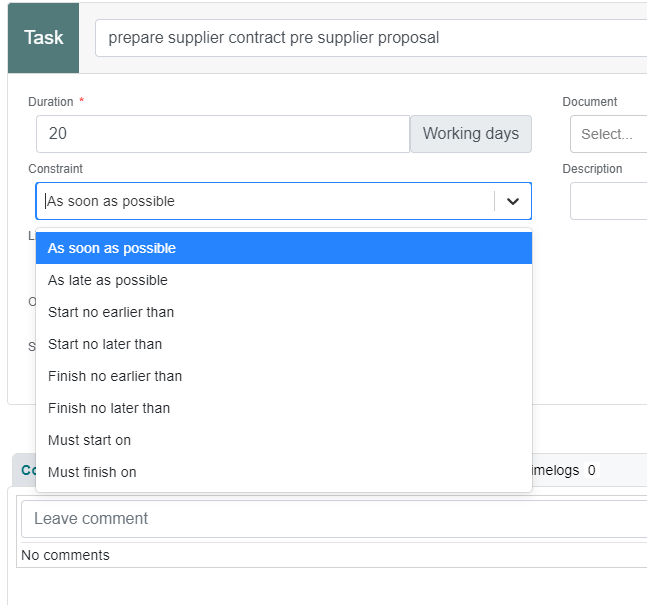
It is important to note that only one constraint can be applied to each task.
The tricky and time-consuming part of updating the schedule lies in marking that a task has factually started or finished on a specific date, which is different from the previously estimated date.
Of equal importance is the fact that a task has NOT started when it was supposed to start.
All of the above can be done manually, but it takes a lot of time, and very often it leads to the project manager getting involved in micromanagement. To prevent this, ProjectContexts has semi-automated this process, without requiring manual manipulation elements inside the schedule. The time saved can be spent more efficiently evaluating the consequences of the changes.
¶ 2. Fact: Actual Start
The actual “early start (ES)” and actual “early finish (EF)” properties of each task allow the re-calculation of the overall schedule. ( As actuals they are simply called “actual start” and “actual finish”). As far as the schedule calculation is concerned, % completion of a task is not part of that calculation. Thus, unless an actual start Is defined, there could be a 100% completion shown ahead of the ES of a task if the actual start is not marked in the schedule.
- Sometimes, team members may log a minimal time to a task that had not “started” because that team member might just have had some time available. The Task Owner needs some leeway to confirm that the task was formally started in the context of the schedule calculation. Therefore, in ProjectContexts the actual start needs a confirmation from the Task Owner. (Technically it would be possible to “start” a task automatically if a minimal approved time was logged against the task.).
- The Task Owner can formally “start” a task at their discretion on a particular date, by pressing the “Start ON” button. In practice, ProjectContexts transparently adds a start constraint date to the task. (“start on” constraint which over-rides predefined relationships.).
¶ 3. Fact: Task should have started: Reschedule
A Task start can always be rescheduled into the future by either adding or editing a lag from a predecessor task to this task.
ProjectContexts allows two types of updates:
- The Task Owner knows exactly when the task will start and is able to use the same procedure as above (using a calendar icon in conjunction with the (auto) application of “start on” constraint.) ProjectContexts allows a re-setting of the actual start date if the estimate was not correct.
- The Task Owner does not know exactly what date should be used. But the fact is that to date the task has not started. As a minimum the schedule calculation should recognize that the task has NOT started: The Task Owner can bring the task forward to today’s date by pressing “Re-Schedule". ProjectContexts will then auto-apply a constraint “ start not earlier than [today]”. Note this has to be done ON-Schedule.
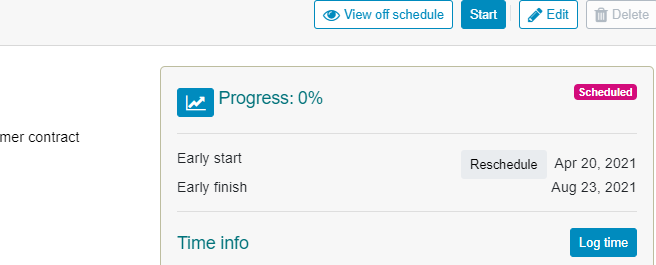
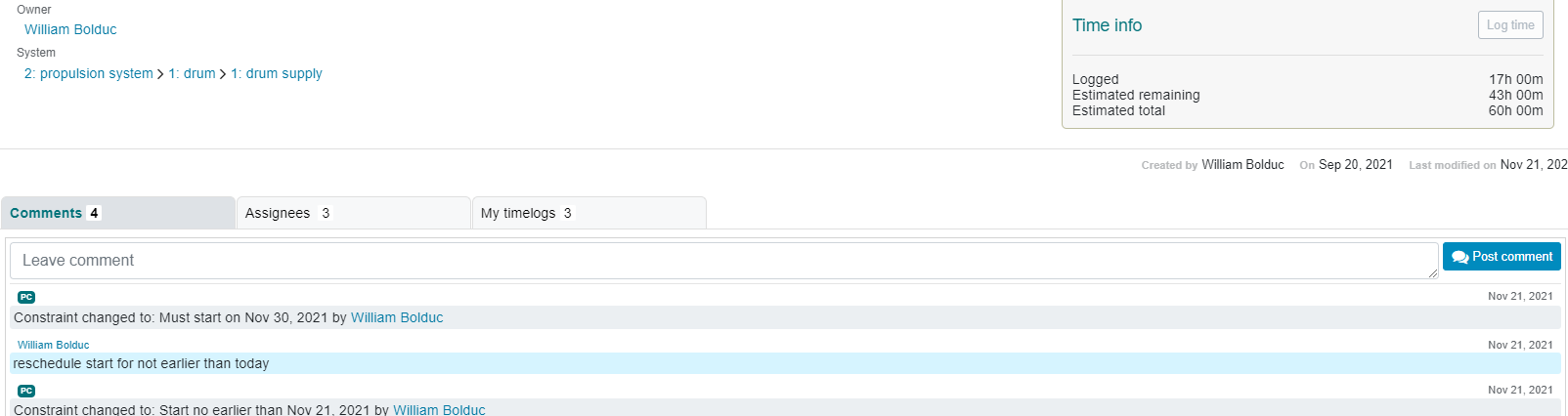
- ProjectContexts tracks the task’s changes in constraints by auto-adding a comment in the task’s comment section.
- The project manager can “batch”- process all late tasks to bring all late tasks to today’s date via a “start not earlier than” constraint. ( Note : this will only be available in Release 2).
Use the highlight button on the schedule to show all tasks that should have started to-date, but have not. ("conflict start date")
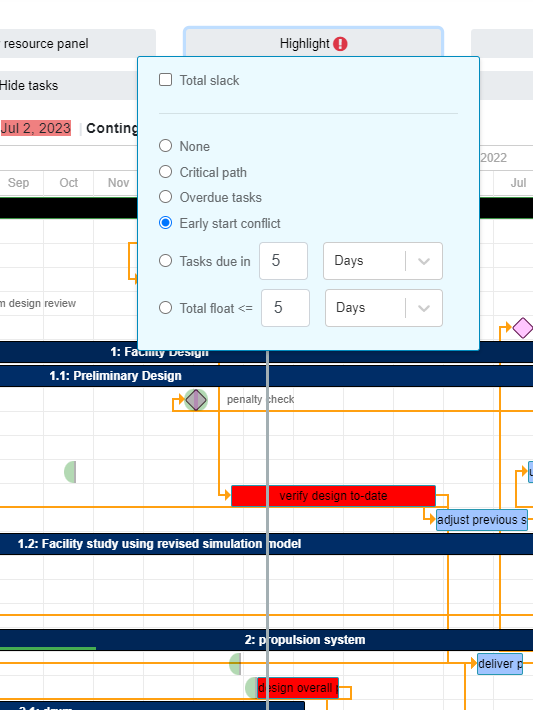
ProjectContexts recommends the following process:
- The project manager defines an update cycle ( e.g. every Tuesday or every second Tuesday), preferably coinciding with a timesheet cycle).
- The Task Owner selects a task that they want to “start”, “re-schedule” or “finish”, and updates the corresponding dates.
- The PM starts a batch processing utility that updates all late starts to today’s start date, and ProjectContexts (auto-) sends a notification to all affected Owners.
¶ 4. Fact: The Task Has Finished
When a task has finished, it should be marked as such. But at the start of that task, a constraint was applied. As only one constraint can be applied, a task can only finish on a particular day if the duration is adjusted accordingly. ProjectContexts performs this calculation automatically. That strategy also allows a true picture to be saved for each of the project tasks, for future reference.
¶ 5. Constraints
As is evident from the above strategy, the Owner needs to be aware of the reasons for the constraint: at the project planning phase, constraints may have been added for legitimate reasons, but the constraints ultimately will be replaced throughout the process of the schedule updating. For that reason, each has a comment box that partly functions similar to a chat box that includes notifications of automatic constraint edit.
¶ 6.Auto Durations
The concepts of Autodurations, the remaining time defined on a timesheet, and team member availability go hand in hand.
By way of example:
William is the Owner of a task that has not yet started. The initial estimated duration is 10 working days
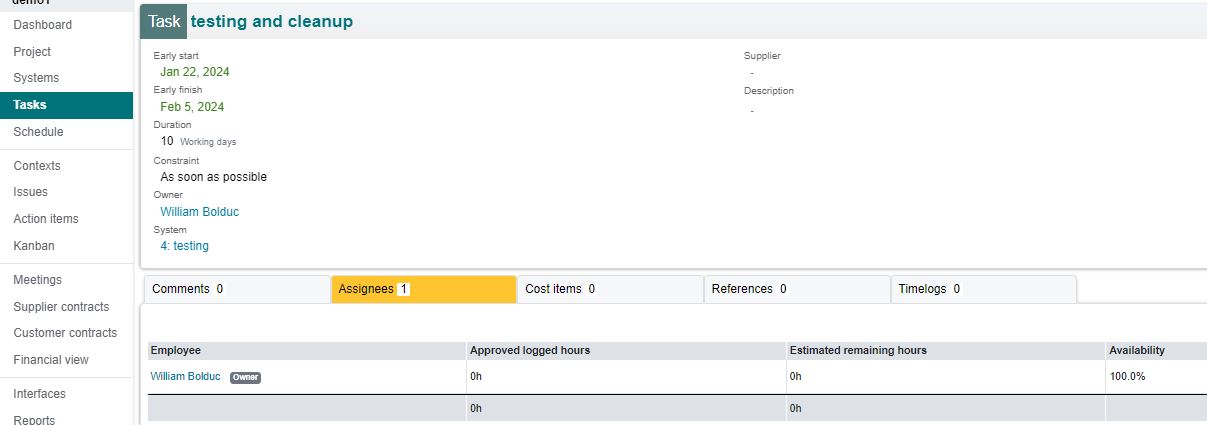
- William is the only assignee to a task. His estimated total hours (at this point in time, equals remaining hours]) is 60 hrs and his [availability] is set at 50%. With a normal working day at 8 hrs/day, he will need a remaining duration of 3 weeks (@ 8x50% =4 hours / day) or 15 more workdays to complete the task. ProjectContexts automates this process and allows the PM the option to adjust the task's [remaining] duration to 15 [days]
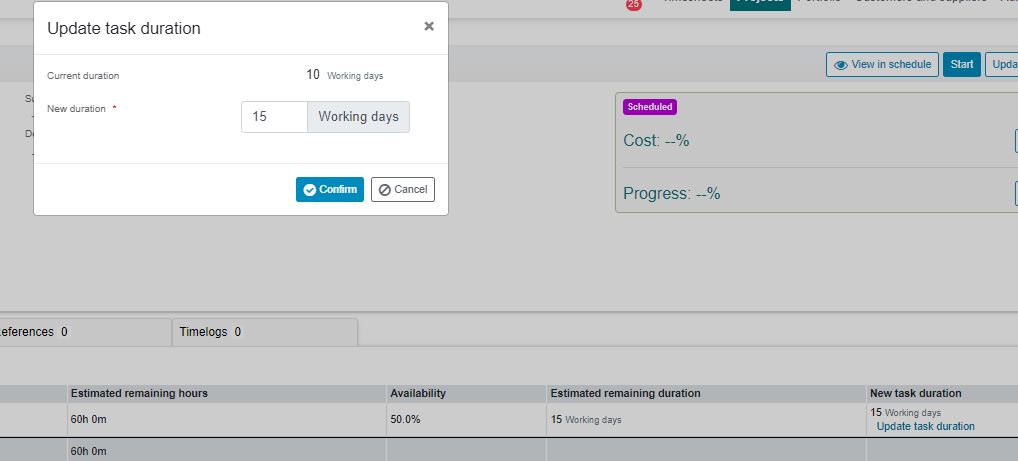
2 Kristen is added as a second assignee. Her estimated total hours is also 60 hours, but her availability is only 40%. As a result., she needs a longer duration. ProjectContexts automatically has calculated a remaining of 19 working days for Kristen, and has suggested that the remaining number of working days should be re-adjusted to 19.

Note: “remaining” is either the initial estimate until time is logged, or afterwards, it is the remaining hours identified on the assignee's timesheet.
¶ 7. Owner Permissions Matrix
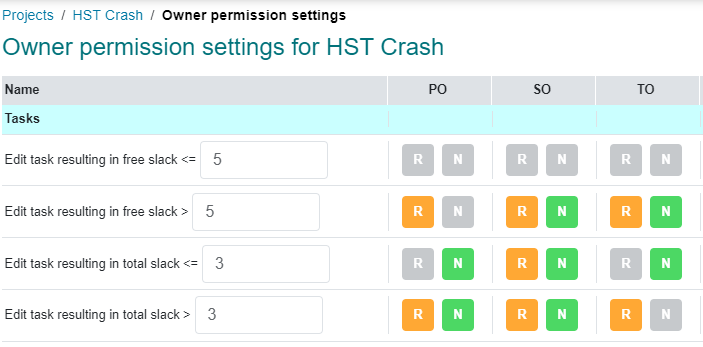
When a Task Owner reschedules a task as described above, free and total slacks will be affected. Consequently, successor tasks may be affected as well, and the updating of one task may result in the auto re-scheduling of other tasks ( which may be the responsibility of different Task Owners).
For these reasons, ProjectContexts introduced an “Owner permissions” matrix to control what a Task Owner may or may not edit. (see below).
The Administration menu includes a section to set up the default Owner permissions; however, the PM can adjust those to reflect their individual management style and to minimize micromanagement while at the same time being notified of small details that may be critical.