¶ Welcome to ProjectContexts Wiki!
If you're ready to jump right in and start using ProjectContexts without diving into lengthy explanations, you're in the right place. Below are quick-start guides to help you get going immediately:
These guides will walk you through the essential steps to make the most out of ProjectContexts—no background reading necessary!
Looking for more detailed information? Explore the rest of the Wiki to dive deeper into everything ProjectContexts has to offer.
¶ ProjectContexts Overview
¶ Foreword-1
This page can be found via a link at the upper left hand corner ("Need Help?") of the ProjectContexts app,
as well as at the bottom right handside ("Help Center")
“Enable PC Assist” allows a member of the ProjectContexts support team to directly access your project under your strict supervision

¶ Foreword-2
ProjectContexts is a project management system, and is not a substitute for other systems such as financial, accounting, contracting etc. systems. Thus, the elements of a contract in ProjectContexts are those details that we believe should influence the management of a project. For example, terms of payment sometimes are seen as the purview of the accounting department, but the project manager should have the relevant details of the terms at his/her finger tips. Estimated future cashflow essentially requires an estimate of future project performance, etc.
¶ First Time Users
A first-time user can start ProjectContexts “out-of-the-box” as it is prepopulated with a sample project with some “set-up” parameters. We suggest however to spend some time scanning through the top right menu ( see below) of the application to make some quick edits if required. (for example, add some employees via the Administration menu)

(1) (2) (3) (4) (5) (6) (7) (8)
| 1 | Go back to where you left off in the project |
| 2 | Notifications to the User regarding time sheets |
| 3 | Timesheets |
| 4 | Crew Timesheets ( shows only if the project uses crews) |
| 5 | Choose an existing project, add a new project (incl. from a template or import a .xml file.) |
| 6 | PMO settings relevant to the administration of projects |
| 7 | Access the portfolio module |
| 8 | Corporate Administraton |
Many of the setup parameters are required to ensure that ProjectContexts follows your company procedures, such as the numbering of projects; however, many of those same parameters are also optional. For example, labor costs do not need to be detailed, however, if they are not then obviously labor costs cannot be calculated as part of a complete progress review of a project. Consequently, in such case, a progress report will only include labor hours.
¶ ProjectContexts has 3 pillars to its foundation:
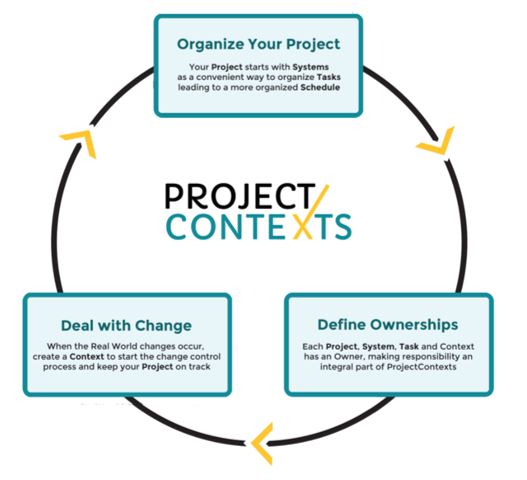
ProjectContexts is intuitive: systems (deliverables) and tasks first are defined OFF-Schedule, after which they are posted to a schedule.
ProjectContexts assigns ownerships to all elements in a project (systems, tasks, etc.).
ProjectContexts manages change via Contexts.
¶ 1. Systems Overview
¶ Conventional project management software
Most existing project management software is schedule-based: A project builds up from an empty schedule that is gradually filled up with tasks. In other words, the software defines the “when ” or “how” before the “what” is defined. Some of those tasks could be summary tasks. A summary task governs a collection of subtasks that show indented on a schedule. Within the confines of a schedule, a task can be “outdented” to become a summary task, for the purpose of a better overview, organization, project manager working style, etc.
Importantly, the duration of a summary task cannot be set because it is calculated as the time between the earliest start and the latest finish of its subtasks.
¶ ProjectContexts structure
ProjectContexts on the other hand is systems-based. A system can be seen as a deliverable, a work package, etc. In other words, the “what” is defined before the “when” and the “how” are added to them.. It is very specific, and in many cases is the basis for a supplier contract. It is also defined outside the confines of the schedule. “Systems” makes ProjectContexts very versatile: a system can be used as a project in itself, essentially allowing “portfolio management".
In ProjectContexts, a project builds down from systems, by adding sub-systems and/or tasks. Systems and Tasks can be viewed in a schedule where (timing) relationships between tasks can be added. Tasks can be added to systems both OFF- and ON-schedule.
Importantly, within a schedule, systems behave like summary tasks, thereby picking up the benefits of the concept of summary tasks..
Sub-systems can be added to systems and a WBS (Work Breakdown Structure) follows automatically. (WBS does not include tasks).
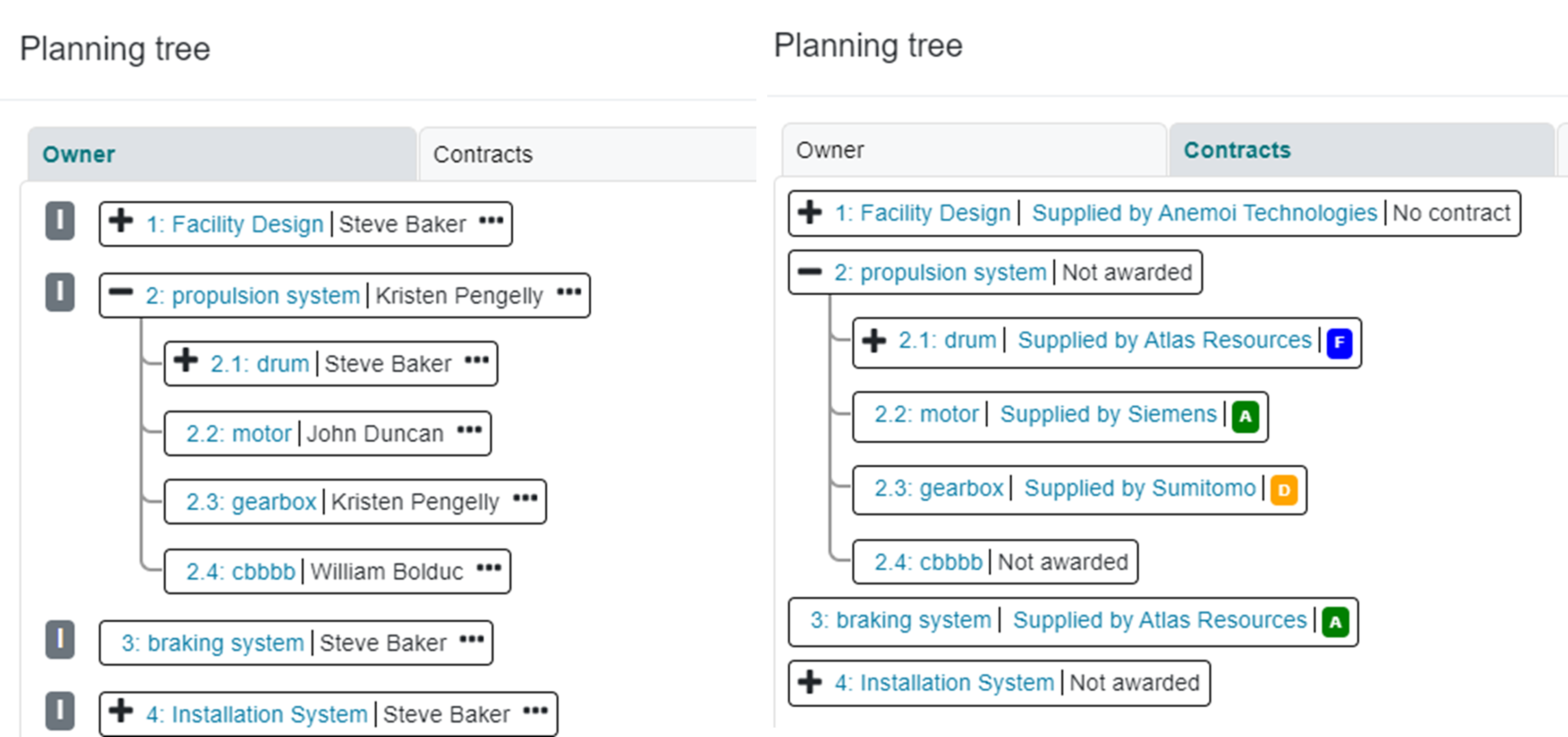
Click on the Planning Tree in the main menu for an up-to-date overview of all systems (incl. WSB), their Owners, and associated contracts. The Owner tree is expandable into tasks and task owners.
There is a close association between systems and contracts. We recommend that the User refers to the planning section. before starting to create systems. There are 3 trees available: Owner, Contracts and Interfaces
¶ 2. Ownership Overview: Individualize Team Empowerment
We believe that the concept of Ownership is unique to ProjectContexts in the context of program management software. Ownership serves several purposes:
- it allows a contradiction in terms: to the project manager it provides an overview of the complete project (the big picture), reduces the need for micro management, and at the same time provides an awareness of small details that may be critical to the success of the project.
- It lets the program manager manage the project in his own management style, unique compared to other project managers in the same corporate setting.
- It instills leadership and management skills in the company's employees.
¶ What is it?
Imagine a task with one assignee: that assignee essentially is solely responsible for the success and/or failure of that task and essentially owns that task.
In ProjectContexts, each element, whether a project, system, or task, has one Owner among all assignees of that element. The Owner can manage tasks inside or outside a schedule, approves logged time to the task, etc.
¶ Dynamic Hierarchy
Regardless of other corporate hierarchies, a Task Owner (TO) reports to a System Owner (SO) who may report to another system owner ( according to the WBS). (The Project Manager is the Project Owner). A higher-order Owner can assign Owners to lower-order elements, can intervene in that lower element, and can be a substitute approver of the (lower-order) timesheets.
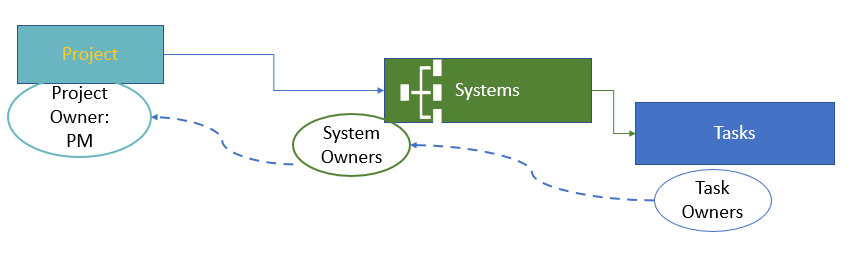
A TO approves the timesheets of the (Task) team, but the TO''s timesheet needs to be approved by the relevant SO; and so forth.
The hierarchy is called dynamic since it is temporary. Someone assigned as a SO in one case could be a TO in another case.
A similar hierarchy exists for the Contexts environment.
¶ Owner Permissions
Owner permissions allow (or not) an activity that normally would belong to an Owner as described above. For example a permission may define under which circumstances a Task Owner can change a relationship on a schedule, in terms of a resulting outcome of free slack.
The structure allows a partial updating of the schedule by the Owners, saving valuable time for the Project Manager.
Defaults are set by the company, however the project manager may edit those permissions according to his/her style of management: The permissions allow the program manager to individualize, within the context of a specific project and a specific project manager, the shades of empowerment of the project team members. Sometimes the concept is associated with the concept of distributed program management.
¶ 3. Contexts Overview
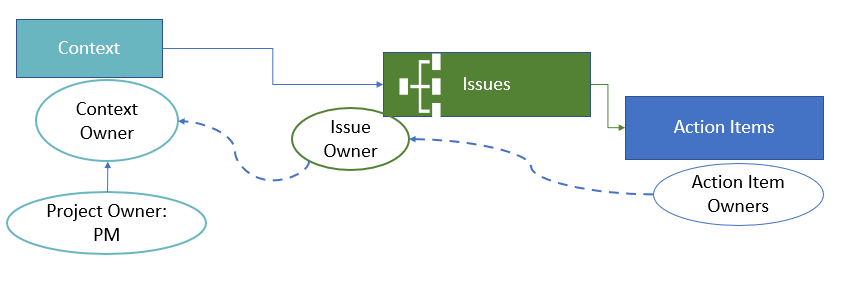
When an unexpected event or scenario happens, it may trigger a series of issues and associated action items.
In ProjectContexts, the Context is the background to that event. For example, that context may be an email from a customer, an accident, etc. Esentially, there is no need anymore for To-Do lists.
In ProjectContexts, we collect similar contexts into context types that are formally defined in the administration menu.
Contexts themselves have their own Owner (CO), who can assign Issue and Action item Owners. (IO and AO respectively). Typically “due dates” are assigned as well, and in most cases, the contexts, issues, and action items are formally associated with a system.
At the time that the event occurs, the PM does not yet know what the resolution will look like, therefore it has to be handled off-schedule.
Ultimately, after the PM is confident that a successful resolution is near, the action item can be transferred to ON-Schedule at the simple press of a button. To avoid confusion, we call these new tasks “Action Tasks”. Because action tasks are associated with systems the transfer to the schedule is convenient since such task is automatically placed in the correct location inside the schedule).
¶ ProjectContexts philosophy
Good project management requires the diffusion of pertinent knowledge to all team members, so that those team members are equipped to enable good decision making.
Knowing the contexts of past actions and decisions is crucial to the decision making of tomorrow. Many companies have experienced drastic disruptions when team members are re-assigned and their functions are taken over by new team members. Tracking those contexts is specially important for a handover to a newly assigned project manager.
Some companies still use un-integrated to-do lists with issues and action items, maybe stored in media such as excel sheets, etc.; in the case of ProjectContexts, all those notes are part of the project and may be recalled and referred to in the future for similar projects, different employees, etc.
¶ Kanban view
By their very nature, contexts and issues are not very well defined (yet), therefore it does not make sense to transfer those to a schedule. Action items may be different and in some cases it may make sense to transfer them to a schedule as a task. ( in ProjectContexts, we call the results “A-Tasks”)
Until such time, Contexts, Issues and Action items can be tracked using a Kanban view.
¶ Unique Features flowing from the ProjectContexts structure.
¶ Contracts
Customer and Supplier contracts are treated similarly in ProjectContexts: similar ways of numbering contracts, define schedule of invoices, synching with schedule milestones, etc.
unique to supplier contracts:
- Systems can be “dropped” in to a supplier contract;
- A procurement process is included, with RFQ (Request for Quotation, Expression of Interest etc.)
- an approval process is included to filter potential suppliers
¶ Caution
At least for the present, Contracts are very suitable for contracts where the contract payment terms are based on events, For example: a 20% payment will be paid on the event of a delivery. That delivery in turn is defined in the schedule as one of the milestones.
Many contracts do not fall in that category: for example, in the legal, architectural and many consultant professions, invoicing is “logged-time” based, typically at a rate according to the employee properties. If the invoicing is not granular to include individual tasks ( i.e. by project only) one could argue that time sheets do not need that granularity either.
¶ Syncing with other project elements
Because systems are not tasks and have their origin outside of the schedule, they can be linked to other project elements, such as contracts: a supplier contract may include one or more systems.
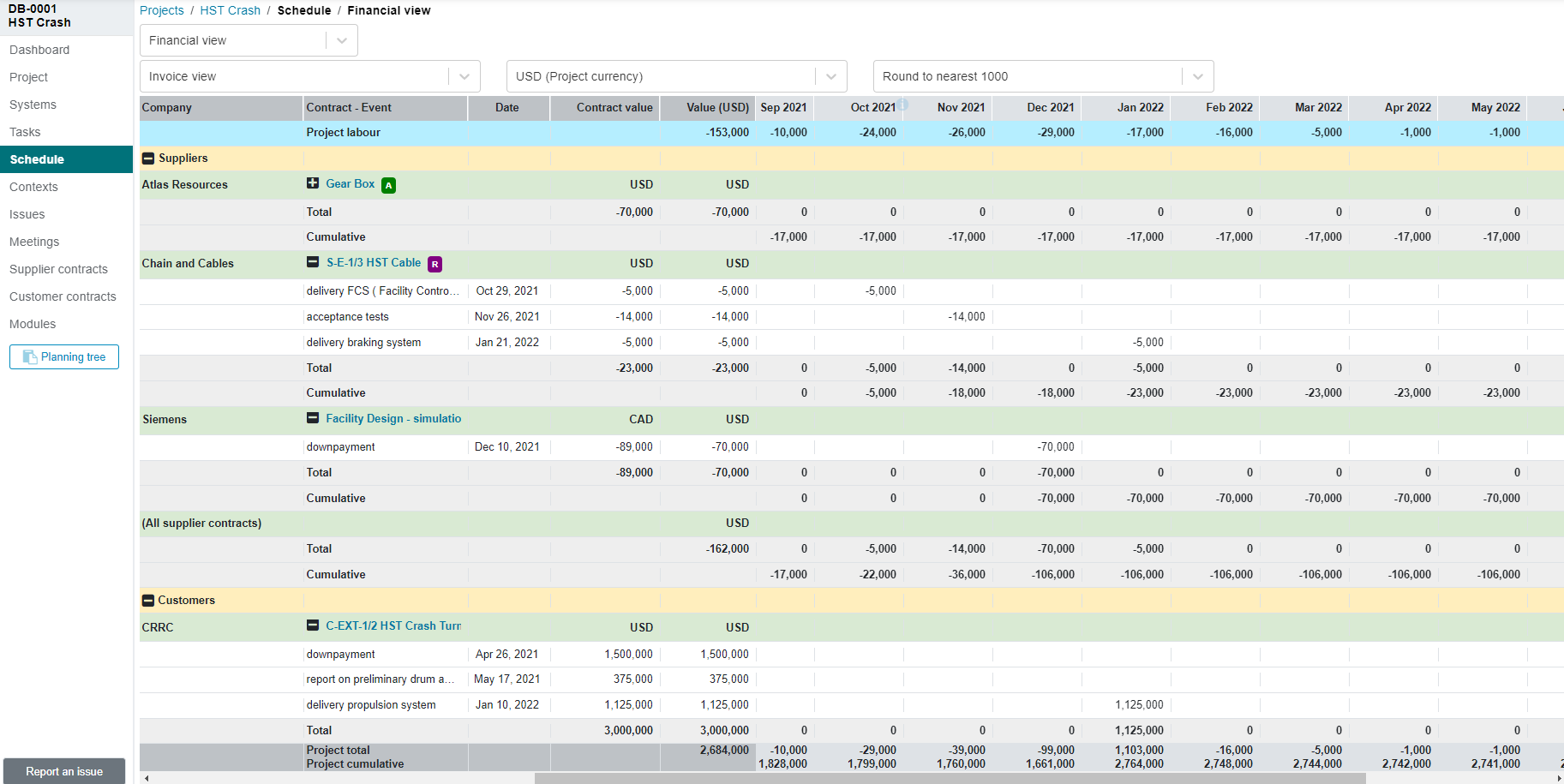
When viewed inside a schedule, a system consists of a number of tasks that in themselves can be related to a milestone. One of the properties of a milestone is the scheduled date. Thus a contract element ( e.g. a schedule of payments) may be linked to a milestone in a schedule ( e.g. delivery of a motor). It is the basis for the ability of ProjectContexts to auto-generate *for example) a cashflow forecast update, timely warnings of potential penalty dates, etc. for the benefit of project managers as well as corporate-level management.
¶ Role Permissions
ProjectContexts includes an extensive permissions utility, set by the company. For example, it allows, or not), categories of employees to view / edit contracts, view financials, etc.
¶ Timesheets
In light of the concept of Ownership, timesheets need to extend down to the task level, and the Task Owner must approve time sheet (lines) belonging to his/her task. A similar process is used for system owners and the Project Manager. The Project Manager time sheet needs to be approved by the PMO. ( Program Manager Office/ Officer)
refer to Logging Time and Approval
¶ Auto generation of progress reports
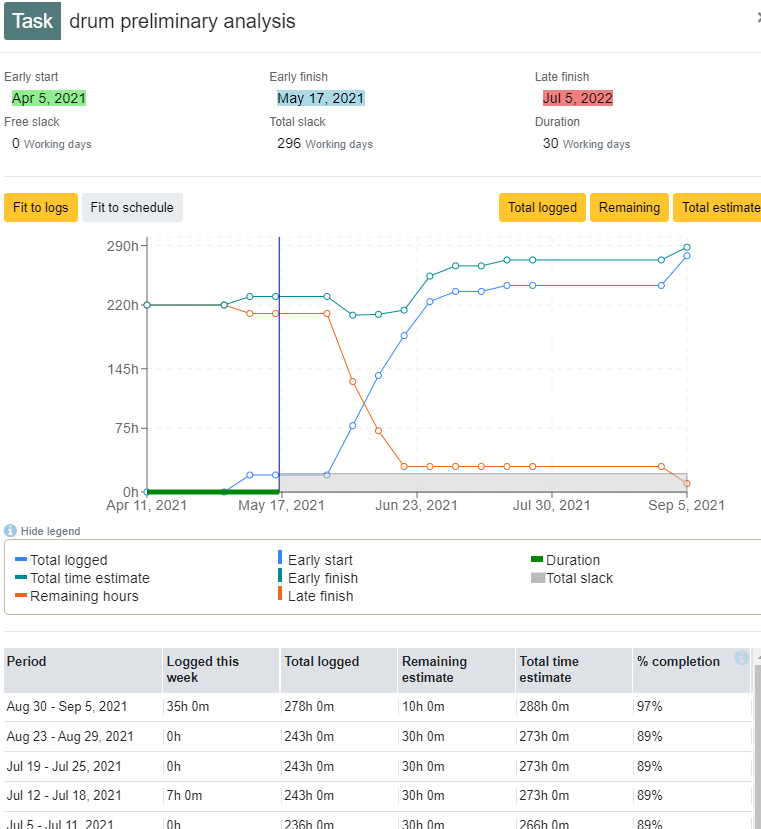
ProjectContexts links timesheets to progress reports, from task all the way to project level. All the elements are included for EVM (Earned Value Management.). ( a detail EVM report section will be available in release 2.0
¶ Interface between the PMO, the Contracting Department and the Accounting System
¶ Employee Expenses
Typically, employee expenses are a small part of the project costs. The requirements from the accounting department are much more extensive than those from the PMO. For example, whether an employee uses his/her own car or uses a taxi with a credit card is important to be captured from an accounting point of view, but not from a PMO point of view. Similarly, the use of credit cards is of no interest to the PMO.
Therefore, ProjectContexts does not include an expense sheet utility. The PM can budget the employee expenses as part of Costs, or OFF- Line.
¶ Timesheets and logging time
Because ProjectContexts' time logging and the use of remaining hours within a timesheet, not only per project but also per system and task, time needs to be logged within ProjectContexts, and obviously that is made available to the accounting department via a CSV format.
¶ Contracts
ProjectContexts does not replace a Contracts Department. Rather, it captures only the relevant data that the PM needs to manage a project, such as as the relationship between the project timeline and the terms of payments. ( “penalties” will be added to Release 2.0)